What a hex editor is used for
A hex editor displays a file as the numeric byte values stored on disk. Unlike a text editor, it does not assume that the content consists of readable characters or lines. This makes it possible to inspect executables, libraries, images, archives, firmware and proprietary formats.
The hexadecimal view exposes every byte while the adjacent text representation helps identify readable strings. Together they provide a direct view of the file's underlying data.
Edit data without losing comparison context
HexCmp places editing inside the binary comparison workflow. After locating a different block, you can work with the relevant bytes while the second file remains visible for reference.
Undo and Redo make it possible to reverse or restore changes. A customizable color scheme can help separate data, selections and differences during longer inspection sessions.
- Modify files directly in hex mode
- Keep the comparison visible while editing
- Use Undo and Redo for changes
- Customize the display color scheme
Search for text and hexadecimal values
Known text can reveal file signatures, embedded paths, identifiers or configuration values. Known byte sequences can locate headers, flags, numeric fields or repeated structures that have no readable text form.
HexCmp search supports both character strings and hexadecimal values. This avoids manually scanning large areas of data and gives you a faster route to the part of the file that matters.
Interpret the selected value
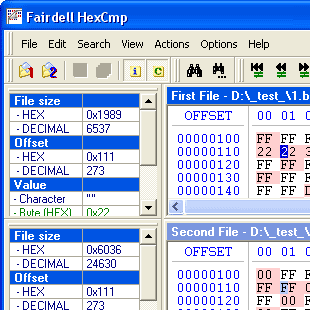
A byte sequence can represent several types of data depending on its position and the file format. The Info Panel shows file information and interprets the cursor position as a character, byte, word or dword.
These views help when investigating field values, comparing numeric changes or checking how a value is stored at a particular offset.
Typical hex-editing tasks
- Inspect headers and binary format structures
- Find and change embedded strings
- Compare flags or numeric values between file versions
- Examine firmware or device data
- Repair a known byte sequence in a damaged copy
- Verify a change against an original file
A compact editor for old and new Windows systems
HexCmp 2 supports Windows 95, 98, ME, NT, 2000, XP, Vista, 7, 8, 10 and 11. It supports files up to 4 GB and keeps the download under 1 MB.