What binary file comparison reveals
Two files may have the same name, extension and visible content while containing different underlying data. A checksum can confirm that they differ, but it cannot show where the change occurred. Binary comparison exposes the positions and byte sequences that are different.
This is valuable when reviewing generated files, investigating firmware revisions, checking modified executables or comparing a known-good copy with a damaged one. The comparison is based on raw data rather than a format-specific interpretation.
How HexCmp presents two files
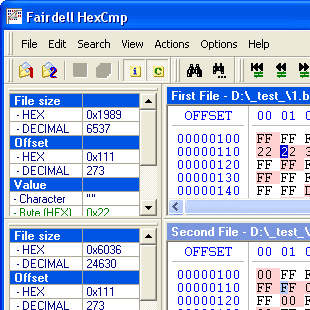
HexCmp opens both files in a synchronized two-pane view. Each side displays hexadecimal values together with a text representation. Changed regions are highlighted so that a difference can be examined in its surrounding context.
Scrolling and cursor movement stay synchronized. Instead of repeatedly calculating matching offsets yourself, you can follow both files together and navigate between different or equal blocks.
- Side-by-side hexadecimal and text views
- Color highlighting for changed data
- Synchronized file and cursor scrolling
- Navigation between equal and different blocks
Binary comparison versus text comparison
Text comparison works well when a file consists of readable lines. It becomes less useful for executables, archives, database files, firmware or documents that contain structured binary data.
Binary comparison treats every byte as meaningful. It can therefore expose differences that have no readable text equivalent. HexCmp also includes a text comparison mode, allowing you to choose the representation that best matches the files in front of you.
Common reasons to compare binary files
Developers often need to check whether two build outputs are identical, identify a changed resource inside a binary or understand how a compiler setting affected an executable. Engineers may compare firmware images, disk images or device data. Support teams can examine a working file beside a failing copy.
- Compare two versions of an EXE or DLL
- Review firmware and binary image revisions
- Check generated output from different builds
- Investigate a changed or damaged file
- Locate modified headers, flags or embedded values
Move from a difference to its meaning
Finding a changed offset is only the first step. HexCmp's Info Panel reads the selected position as a character, byte, word or dword. Search can locate a text string or hexadecimal sequence, and the integrated editor allows the data to be modified without opening another application.
This combination makes HexCmp more than a visual diff. It is a compact environment for comparing, navigating, interpreting and editing binary data.
File size and Windows compatibility
HexCmp supports files up to 4 GB. Version 2 runs on Windows 95, 98, ME, NT, 2000, XP, Vista, 7, 8, 10 and 11, covering both legacy systems and current Windows installations.